How to Choose the Best Business Desks for Your Office?

Choosing the best business desks for your office is not simply a matter of matching color, price, or brand. A suitable desk should support focused work, comfortable posture, cable control, and changing work patterns. Gallup’s State of the Global Workplace 2024 report found that only 23% of employees were engaged globally in 2023. That figure does not prove that furniture causes disengagement. Still, it raises a useful question: can a desk make productive work easier?

Gensler Research Institute’s Global Workplace Survey connects workplace quality with employee effectiveness and experience. Leesman Index research also measures workplace performance through employee feedback, rather than appearance alone. These findings suggest that business desks should be evaluated through daily use. Imagine a worker switching between a laptop, monitor, notebook, and video call. A shallow surface may create clutter within minutes. A fixed height may also become uncomfortable during a long afternoon.

Practical details matter.

Look for stable frames, adequate depth, rounded edges, and accessible power outlets. Adjustable-height models can support different users and work positions. The Occupational Safety and Health Administration recommends neutral wrist and arm positions for computer workstations. BIFMA ergonomic guidance offers additional furniture design considerations. However, no report can identify one perfect desk for every office. I would not treat “ergonomic” as a guarantee. Marketing language can be vague, and real employees may use desks differently than planned. The strongest choice combines reliable standards, measured room dimensions, employee feedback, and a realistic budget. This guide explains how to compare those factors before your office invests in a complete desk system.
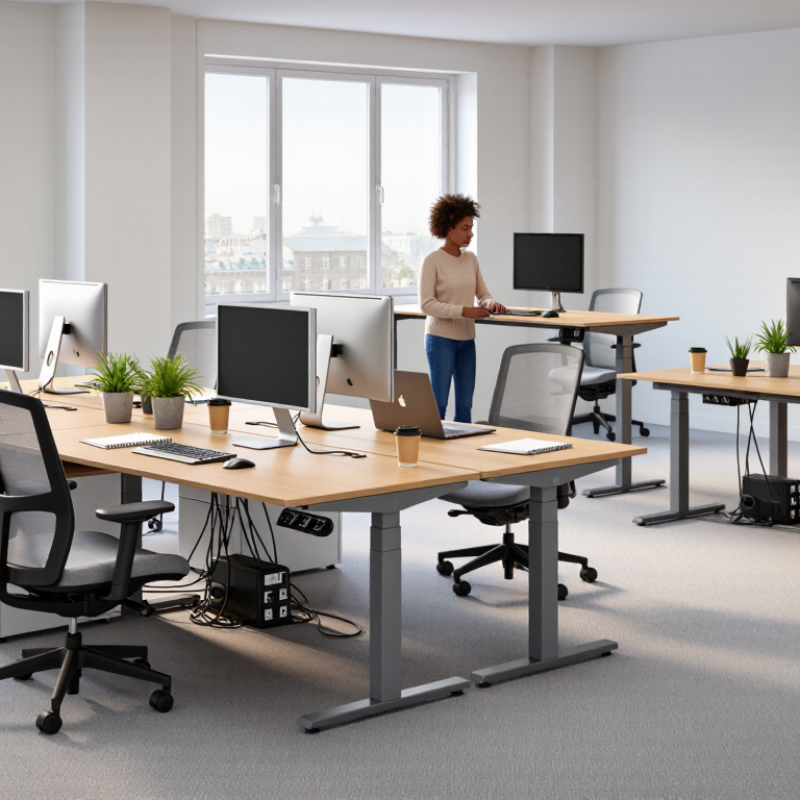
How to Choose the Best Business Desks for Your Office?

Define Office Needs and Desk Functions

Choosing the best business desk starts with defining office needs, not browsing finishes. Map daily tasks, team size, meeting frequency, storage demands, and technology use. A finance employee may need a deep, fixed workstation for two monitors. A sales team may need smaller desks, shared screens, and quick collaboration zones. According to the 2024 Gensler Global Workplace Survey, employees still value the office for collaboration and focused work. Therefore, one desk type rarely serves every function well.

Measure the room before selecting furniture. Record wall lengths, power locations, walking routes, and accessibility clearances. Leesman’s workplace benchmark, based on more than 1.3 million employee responses, shows that workplace effectiveness depends heavily on how well spaces support specific activities.

A desk that looks efficient on a floor plan may feel cramped after a monitor, notebook, and coffee cup appear. I have seen teams choose narrow desks to save space, then lose productivity because cables and documents crowded the surface. That choice deserved more testing.

Tips: Create a simple task-to-desk chart. Mark each task as focused, collaborative, technical, or mobile. Test one sample desk for a full working day. Check screen height, legroom, glare, noise, and cable access. Ask employees what interrupts them most. Their answers may challenge the original layout. Also, leave some flexibility for hybrid schedules; occupancy assumptions can change faster than furniture budgets.

Compare Desk Types for Different Workstyles

Choosing the best business desk starts with workstyle, not appearance. The U.S. Bureau of Labor Statistics reported that 22.3% of employed people worked from home on workdays in 2023. Hybrid teams therefore need flexible desks, clear storage, and simple reconfiguration. Individual desks suit focused analysts and writers. L-shaped desks help users managing multiple screens or paper files. Bench-style desks support quick collaboration, but noise and privacy can become real problems. Sit-stand desks suit employees who alternate between calls, computer work, and short meetings. They are useful, not magical.

Tips: Match desk depth to equipment. Leave space for elbows and documents. Follow the U.S. Occupational Safety and Health Administration’s workstation guidance. Position the monitor near eye level, keep feet supported, and avoid reaching across the desk. For hybrid offices, pair shared desks with lockers and cable access. A desk without storage may look efficient, then create clutter by Friday.

In office planning, a smaller desk can improve circulation, but only when teams have nearby meeting surfaces. One imperfect assumption is that every employee wants a sit-stand model. Some users prefer a stable seated setup, especially during long writing tasks. Test desk samples with actual chairs, screens, and bags before ordering. The 2023 American Time Use Survey also shows that remote work remains significant, yet work patterns differ widely by occupation. Choose adjustable layouts rather than one universal desk type.

How to Choose the Best Business Desks for Your Office?

Compare typical commercial desk dimensions to match different workstyles, equipment needs, and collaboration patterns.

How to read the chart: Larger desktop widths and depths generally provide more room for multiple monitors, documents, and shared equipment. Standard desks suit focused individual work, bench desks support space-efficient team layouts, L-shaped and executive desks provide more workspace for multitasking, and sit-stand desks add posture flexibility.

Evaluate Size, Layout, Materials, and Durability

How to Choose the Best Business Desks for Your Office?

Size and layout should follow real work patterns, not showroom appearances. Measure each workstation, including chair movement, cable routes, and access to storage. A 1,200-millimeter desk may suit focused laptop work, but larger screens need deeper surfaces. Allow clear paths around shared desks. Corners matter. Gallup’s State of the Global Workplace 2024 reports that only 23% of employees were engaged globally in 2023. A cramped, inflexible layout will not improve that figure.

Materials affect daily comfort and long-term value. High-pressure laminate usually resists stains and minor scratches better than untreated wood. Solid wood feels warmer, but it needs stable humidity and careful maintenance. Check edge sealing, fastener quality, and the underside finish. Those details are easy to miss. The U.S. Environmental Protection Agency’s 2023 Indoor airPLUS guidance emphasizes low-emitting materials in occupied spaces, so ask suppliers for documented emissions information.

Durability needs evidence, not confident sales language. Look for testing against recognized ANSI/BIFMA requirements, including stability, strength, and cycle performance. Compare warranty terms with the expected replacement period. A desk supporting monitor arms should have reinforced attachment points. In practice, even a strong frame can fail when overloaded unevenly. I have seen attractive surfaces survive years while weak cable trays break within months. Review maintenance records after installation, then adjust the specification when experience proves it wrong.

How to Choose the Best Business Desks for Your Office? - Evaluate Size, Layout, Materials, and Durability

Desk Type Typical Dimensions Recommended Work Area Common Materials Layout Efficiency Durability Considerations Storage Capacity Best Office Use
Standard Rectangular Desk 120–160 cm wide × 60–80 cm deep Single monitor, keyboard, documents, and standard office equipment Engineered wood, laminate surface, steel or powder-coated legs ★★★★★ Laminate resists ordinary scratches and stains; reinforced legs improve stability Moderate; often available with one drawer or mobile pedestal Individual workstations, administrative offices, and general-purpose rooms
Compact Desk 80–120 cm wide × 50–60 cm deep Laptop, compact monitor, keyboard, and essential accessories Laminate-coated particleboard, engineered wood, metal frame ★★★★★ Suitable for light to moderate use; edge protection helps prevent moisture damage Low; usually limited to a drawer or under-desk shelf Small offices, reception areas, touchdown spaces, and shared work zones
L-Shaped Desk 140–180 cm per side × 60–80 cm deep Multiple monitors, paperwork, telephone equipment, and active project materials Laminate or veneer worktop, steel support frame, engineered-wood panels ★★★★☆ Corner joints and support beams should be reinforced to reduce movement over time High; commonly includes drawers, cabinets, or space for a pedestal Managers, project coordinators, and employees who divide digital and paper tasks
U-Shaped Workstation 180–240 cm wide × 180–240 cm deep Several monitors, files, meeting materials, and frequent-access equipment Commercial laminate, engineered wood, steel brackets, and modesty panels ★★★☆☆ Strong construction is essential because the larger surface carries more equipment and load Very high; can include multiple drawers, cabinets, and overhead storage Private offices, senior workstations, and roles requiring extensive reference materials
Bench-Style Shared Desk 120–160 cm per person × 60–80 cm deep One workstation per user with shared cable management and modest personal storage Laminate or melamine worktop, steel frame, shared privacy screens ★★★★★ Powder-coated steel frames provide good structural strength; durable finishes support frequent use Low to moderate; usually paired with mobile pedestals or shared cabinets Open-plan offices, collaborative departments, and space-efficient team layouts
Sit-Stand Desk 120–180 cm wide × 60–80 cm deep; adjustable height usually about 65–125 cm One or two monitors, keyboard, task lighting, and ergonomic accessories Laminate or solid-wood top, electric lifting columns, steel base ★★★★☆ Check lifting capacity, motor cycle rating, frame stability, and warranty coverage Low; storage is generally provided by separate mobile units Ergonomic workstations, hybrid offices, and users who alternate between sitting and standing
Executive Desk 160–220 cm wide × 80–100 cm deep Large monitor setup, documents, meeting space, and presentation materials Veneer, high-pressure laminate, solid-wood edging, metal or wood supports ★★★☆☆ Thicker tops and strong joinery improve longevity; veneer requires protection from moisture and heat High; drawers, lockable pedestals, and integrated cable compartments are common Private offices, leadership spaces, and roles involving confidential documents
Training or Folding Desk 120–180 cm wide × 45–60 cm deep Laptop, notebook, and temporary training or meeting materials Laminate worktop, tubular steel frame, locking casters ★★★★☆ Locking mechanisms, durable edge bands, and robust casters are important for repeated reconfiguration Low; designed for flexibility rather than built-in storage Training rooms, multipurpose offices, workshops, and flexible meeting areas

Selection note: Allow approximately 90–120 cm of clear circulation space behind an occupied desk where possible. Confirm doorways, lift access, cable routes, power outlets, and accessibility requirements before purchasing.

Assess Ergonomics, Storage, Technology, and Accessibility

When choosing business desks, assess how people will work, not only how desks look. A useful desk supports neutral posture, clear movement, and daily concentration. Set the monitor at eye level, with elbows near 90 degrees and feet resting firmly on the floor. Leave enough legroom for different body sizes. Measure it.

During office planning, I test desk height with a real chair and keyboard. This simple check often reveals uncomfortable edges or limited knee space. Adjustable desks can support varied users, but adjustment controls must remain easy to reach. Do not assume one setting fits everyone. Storage also affects efficiency. Drawers should hold files without blocking leg movement. Lockable compartments may protect confidential documents, while open shelves keep frequently used materials visible. Too much storage can encourage clutter.

Technology needs careful attention. Route cables through accessible channels, leaving space for power adapters and future equipment. A desk that hides every cable may still be difficult to repair. Accessibility requires wider routes, clear floor space, and controls usable with limited reach or strength. Provide contrast between desk edges and surrounding surfaces when possible. Ask employees with different mobility, vision, and working needs to test the layout. My first office plan ignored wheelchair turning space, despite meeting basic measurements. That mistake changed the final arrangement. No checklist catches every problem.

Set a Practical Budget and Select the Best Desk Range

Choosing the best business desk starts with a realistic budget, not a stylish photograph. In my office planning experience, teams often underestimate delivery, assembly, cable management, and future replacement costs. A desk priced at $250 may need another $80 in accessories. Leave a small financial buffer for these details. It prevents rushed compromises later.

Tips: Measure each workstation before browsing. Record wall length, walking space, monitor width, and storage needs. Compare the total cost, not only the listed price. Test one desk for a week when possible. Notice wobbling, sharp edges, difficult drawers, and uncomfortable height. Small problems become expensive across twenty workstations.

Select a desk range that matches different tasks. A compact model may suit reception areas, while deeper surfaces support dual monitors and paperwork. Adjustable-height desks can help employees change posture during long shifts, but they usually require more planning and maintenance. Check weight limits, surface durability, warranty terms, and replacement-part availability. Avoid choosing every desk from one range without testing it. Uniformity looks efficient, yet it may ignore real differences between finance, design, and customer-service roles. A mixed range can work better, although it may complicate visual consistency. That trade-off deserves honest review.

We have the largest selection of new, remanufactured and quality pre-owned office furniture in the tri-state area.  We ship nationwide with regular deliveries to Pittsburgh, Erie, Uniontown, Washington, Akron, Cleveland, Beckley, Charleston, Clarksburg, Huntington, Morgantown, Parkersburg, Wheeling, Ashland, Ironton, and Lexington.

PITTSBURGH, PA

Showroom & Corporate Offices
1 Sexton Road
Pittsburgh, PA 15136

Local: (412) 771-0760
Fax: (412) 771-0764

WHEELING, WV

By Appointment Only
Local: (304) 232-0727

CHARLESTON, WV

Showroom
125 Lakeview Drive, Suite G
Cross Lanes, WV 25313

Local: (304) 345-3773
Fax: (681) 265-9039

MORGANTOWN, WV

By Appointment Only
Local: (304) 381-9119

HOURS OF OPERATION:

MONDAY-FRIDAY: 9am-5pm
SATURDAY: By Appointment